E-signature

Place fields, set the order, hit send.

Drag signature, initials, date and text fields exactly where they belong, assign each recipient, and Folio checks everything is in place before it goes out.

Four field typesSignature, initials, date, text
Signing orderSequential or all at once
Audit trailEvery action time-stamped
Recipients sign freeNo account needed
Prepare & send

Drag fields on, assign signers, send

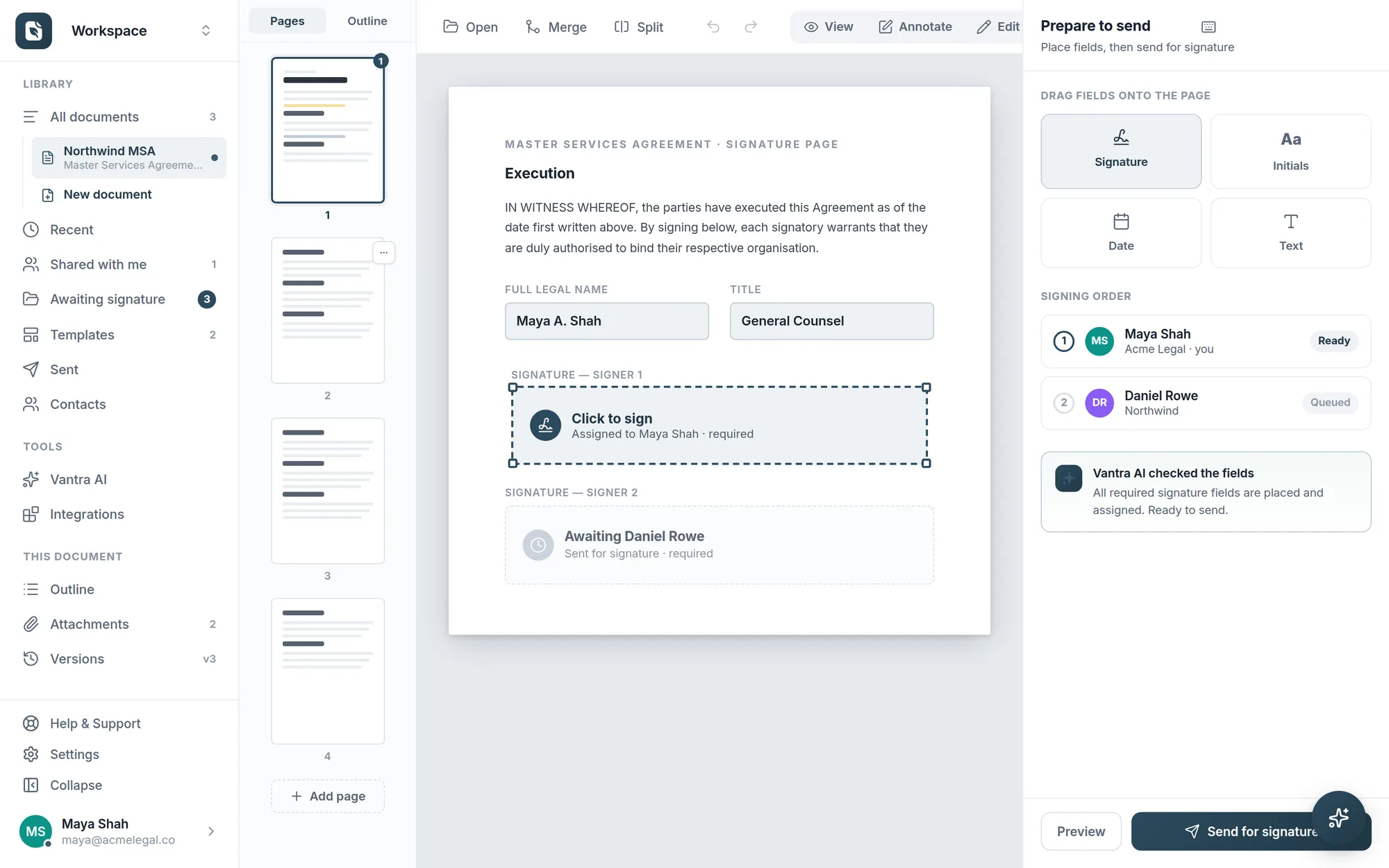
Four field types snap onto the page. Sequence multiple signers, and pre-send checks confirm every required field is placed and assigned.

  • Four field types — signature, initials, date, text
  • Signing order for multiple recipients
  • Pre-send checks catch missing fields
Preparing a document to send: field palette, signing order and an AI field check.
For your recipients

Effortless on the other side

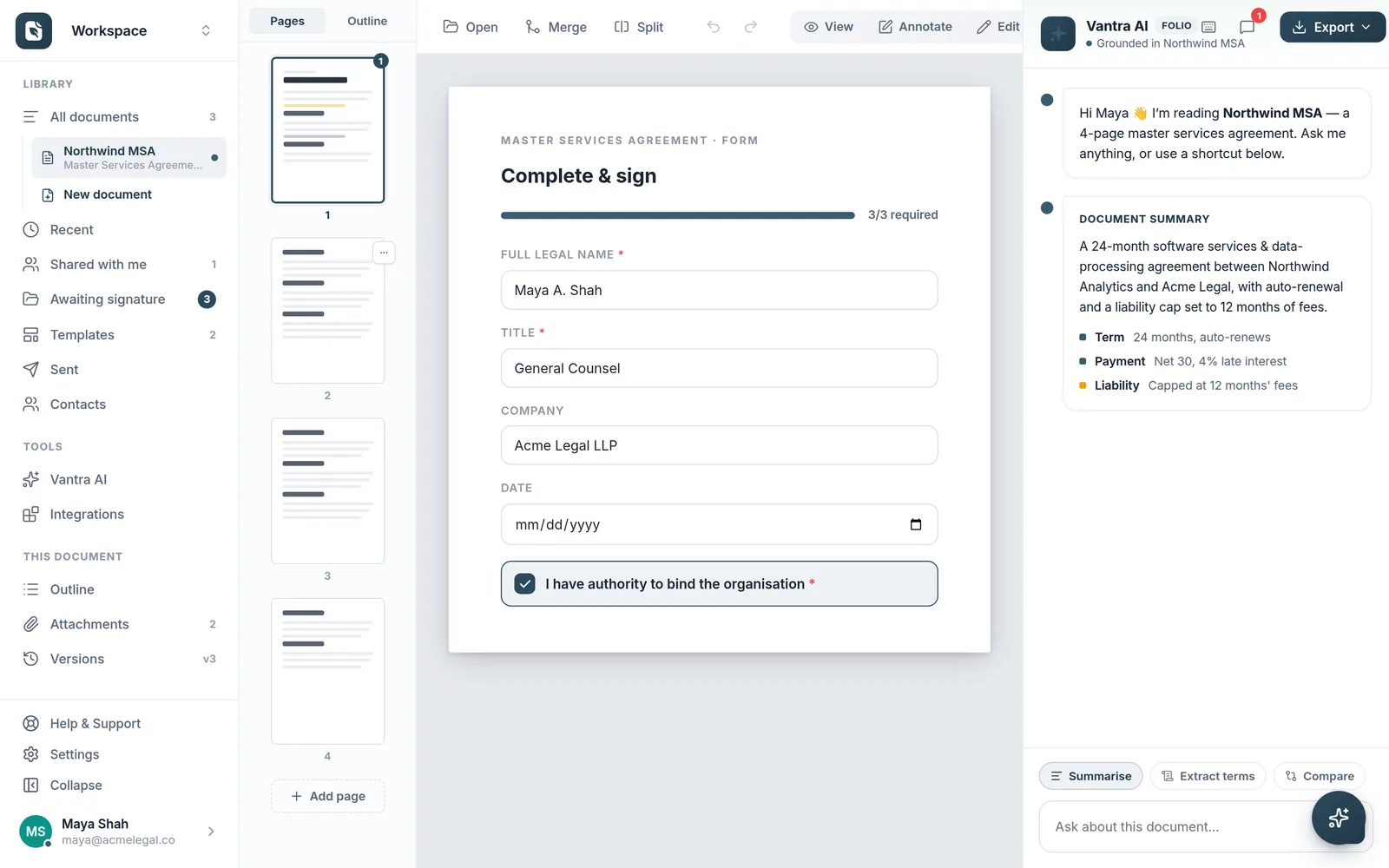
Recipients open a secure link and see exactly what to complete — a guided flow with progress and required fields. No account, no downloads, any device.

  • Secure signing links — no account needed
  • Guided flow with progress & required fields
  • Sign on any device, in the browser
The recipient's guided complete-and-sign view.
Why it's better

Retire the print-sign-scan routine

One secure link per signer, real electronic signatures, live tracking.

Real e-signatures

Done in the browser, legally recognised.

Signing order

Sequence signers and watch each step complete.

Live tracking

See who's signed and send one-click reminders.

Secure by default

Encrypted in transit, scoped links per recipient.

How it works

From prepared to signed

Three steps, and the finished document lands back in your library on its own.

1

Prepare

Drop signature, initials, date and text fields onto the page and assign each one to a recipient. Folio checks nothing is missing before you send.

2

Send

Set the signing order and send. Each signer gets a secure link and a guided flow — no account, no downloads, on any device.

3

Track & store

Watch progress in real time, nudge anyone outstanding, and get the completed PDF with a full audit trail attached.

FAQ

E-signature questions

Are Folio signatures legally valid?

Yes. Folio captures each signer's intent and identity alongside a tamper-evident audit trail — time-stamped actions, IP address, and a sealed final document — meeting the requirements for electronic signatures under the UK/EU eIDAS regulations and the US ESIGN Act.

Do the people I send to need a Folio account?

No. Recipients open a secure link in their browser and complete the document through a guided flow — no account, no app, nothing to install. Only the person sending needs a Folio account.

Can I control the order people sign in?

Yes. Set a signing order and Folio invites each recipient in turn, or send to everyone at once. You can add automatic reminders and an expiry date so nothing stalls.

What do I get once everyone has signed?

A finalised PDF with every signature embedded and a complete audit trail — who signed, when, and from where — stored in your library and downloadable whenever you need it.

More questions? Talk to us →

Get it signed in minutes.

From prepared document to secure signing link in a few clicks — and live status until it's done.