Documents & e-signature, together

The document workspace built for getting things signed.

Create, prepare, and send documents for secure electronic signature — all in one workspace.

Free to start No credit card required Sign in with Google or Microsoft

Brightwave NDA signed2 of 2 recipients complete
Vantra AILiability capped at 12 months' fees
folio.vantrasoftware.com
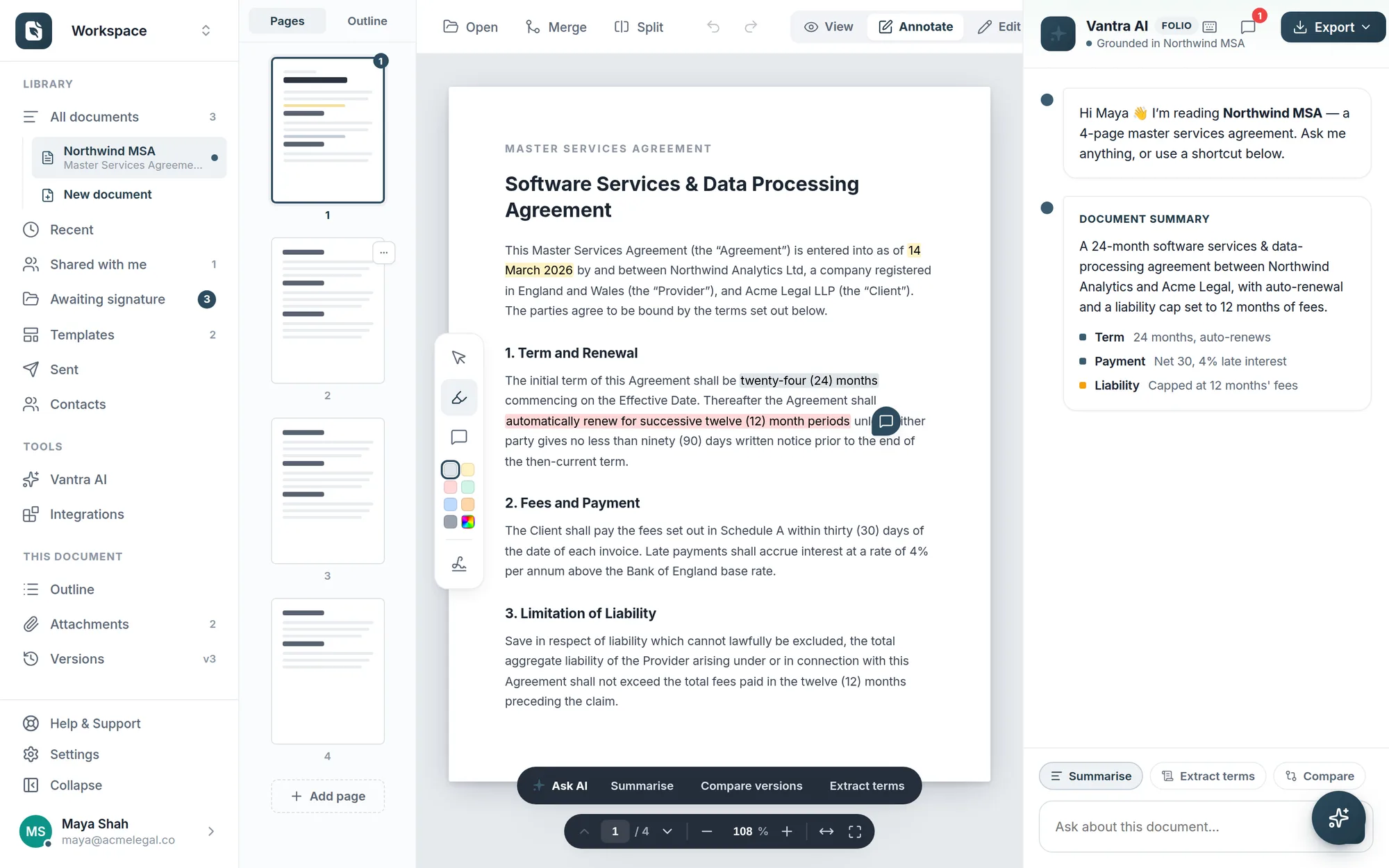
The Vantra Folio editor: a master services agreement open with highlights, comments, and the Vantra AI panel summarising key terms.
Minutes, not daysFrom upload to signed
Encrypted in transitTLS on every connection
Recipients sign freeNo account or download needed
AI built inSummaries, checks & drafting help
See it in action

One workspace, every step

Click through the real product — from first draft to signed document.

The Folio editor: an agreement open with highlights, comments, and the Vantra AI summary panel.
Edit & review — highlight clauses, drop comments, and let Vantra AI summarise the key terms.
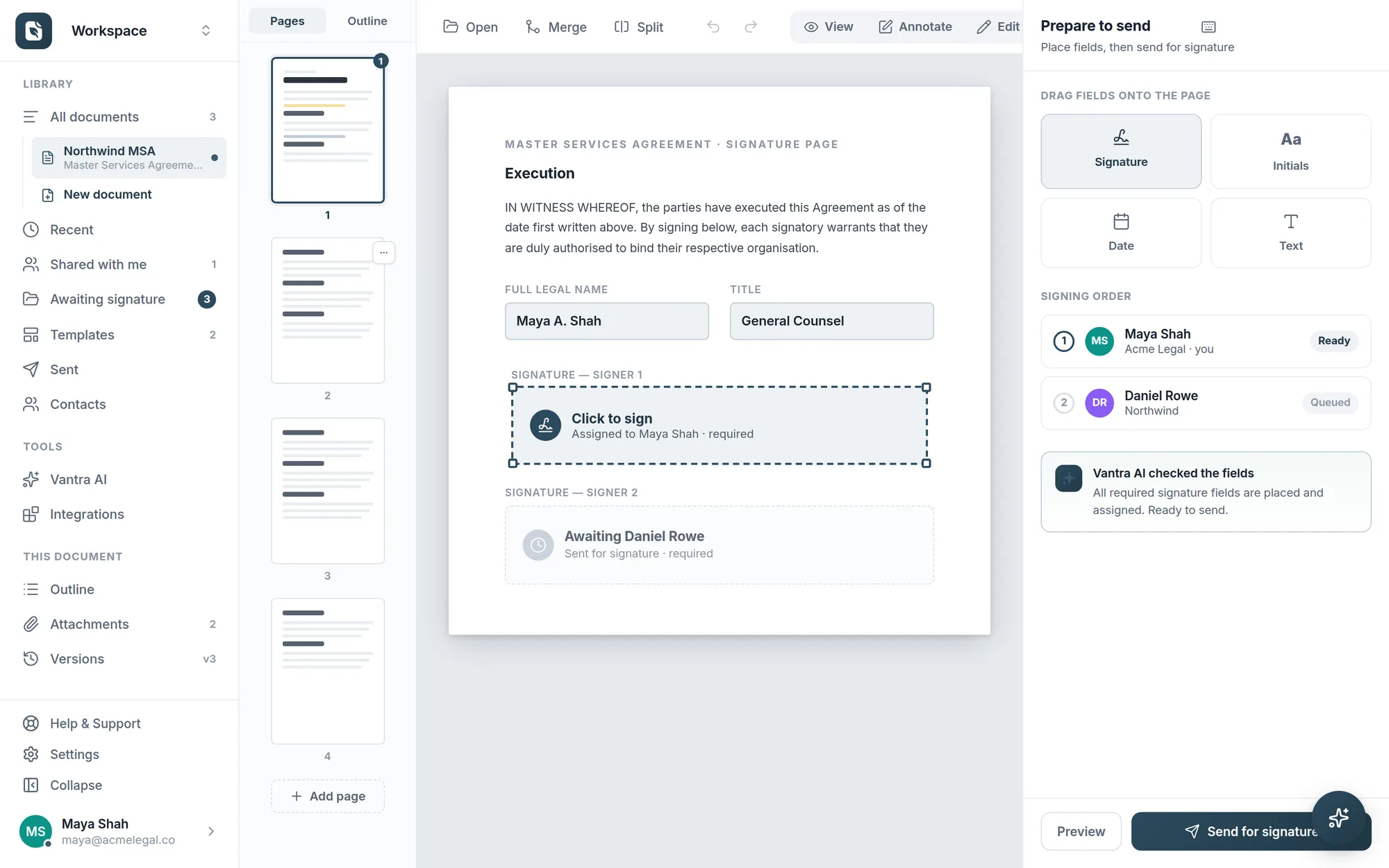
Prepare-to-send: drag-and-drop field palette, signing order, and an AI field check.
Prepare & send — drag fields on, assign each signer, set the order, and send.
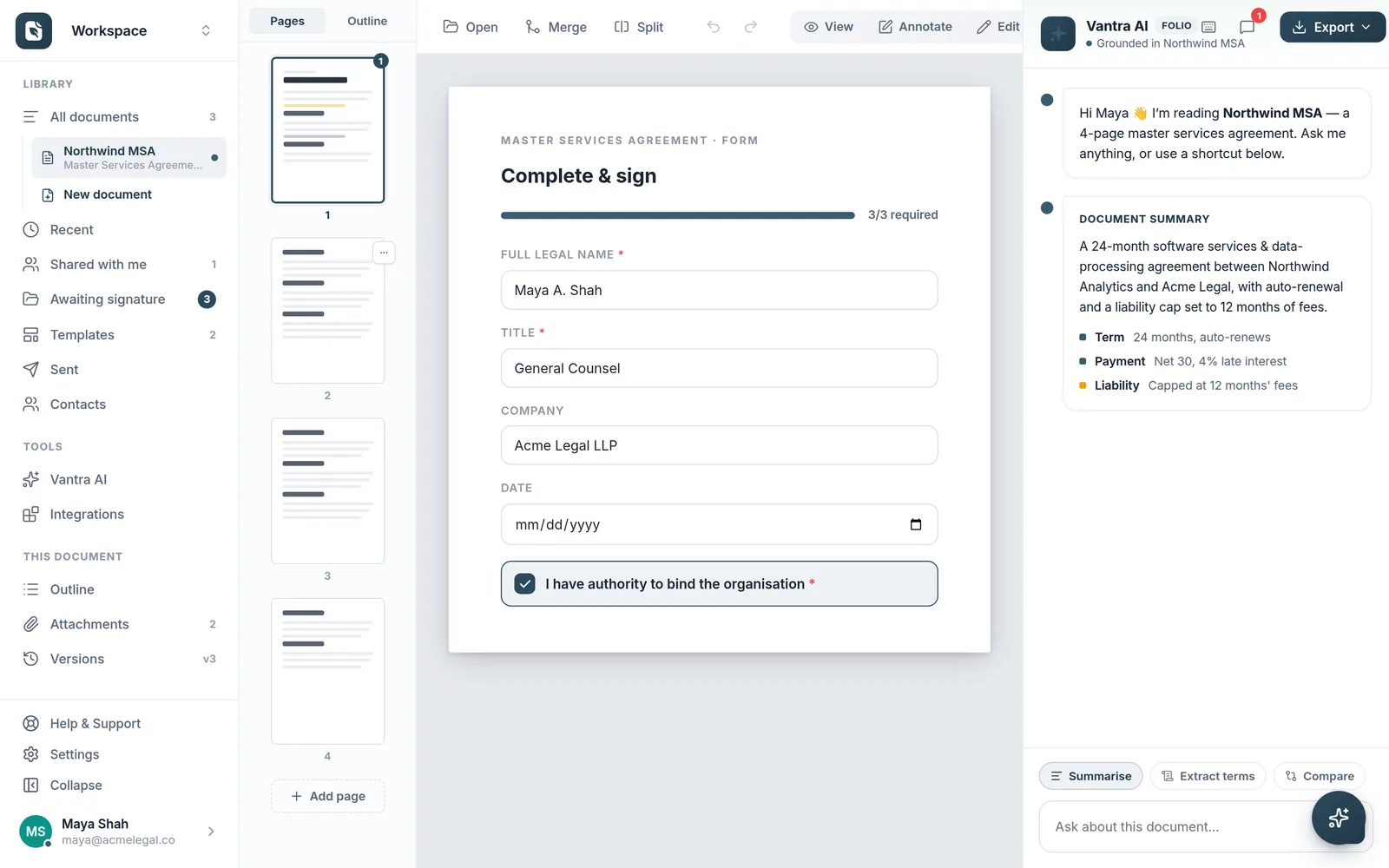
The recipient's guided complete-and-sign form with progress bar and required fields.
Complete & sign — recipients get a guided form on a secure link. No account needed.
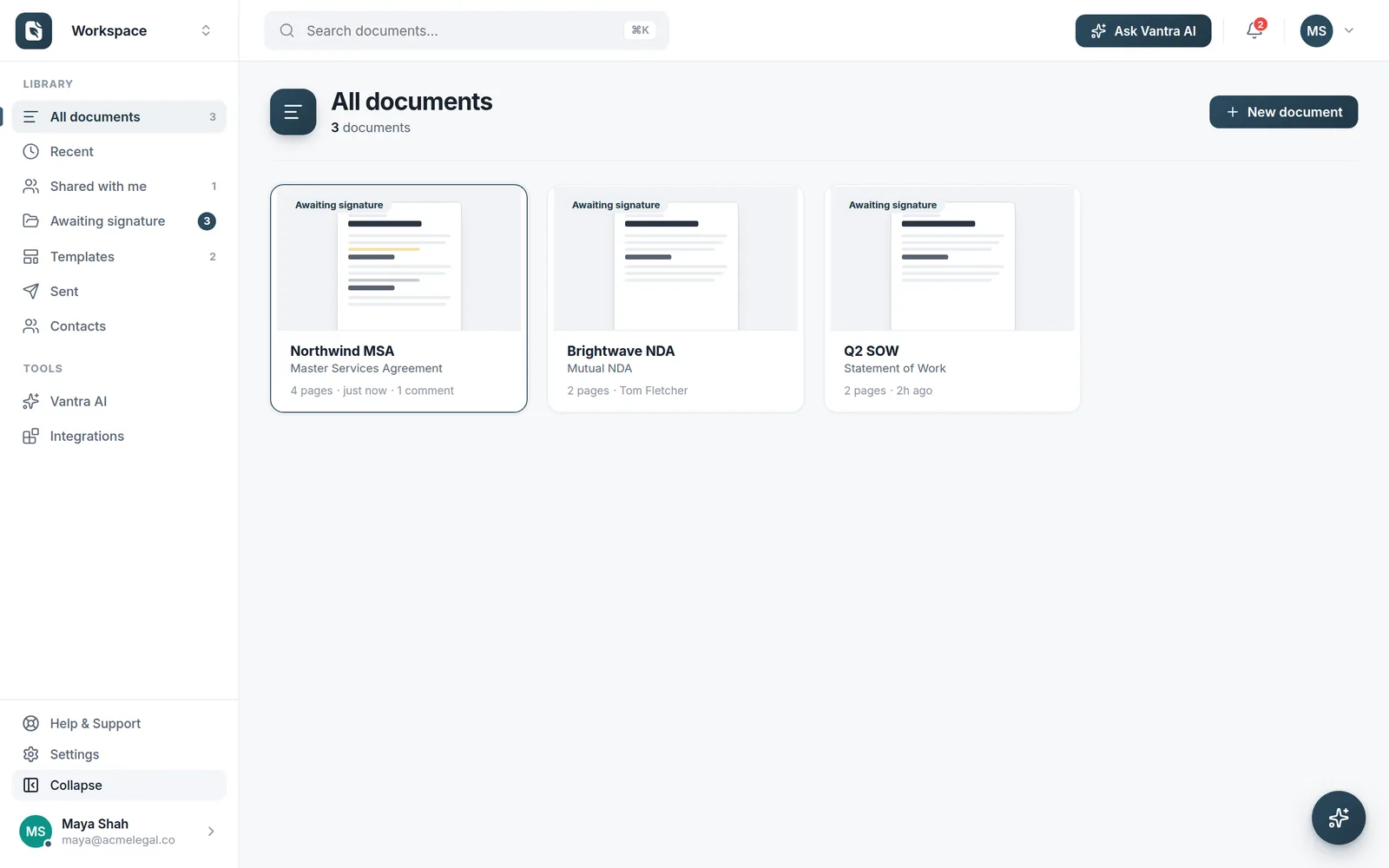
The library with live awaiting-signature status on every document.
Track in the library — live status on every document, searchable with ⌘K.
E-signature

Place fields, set the order, hit send

Drag signature, initials, date, and text fields exactly where they belong, assign each to a recipient, and define the signing order. Folio checks everything is placed before it goes out.

  • Secure signing links — recipients sign online without creating an account
  • Signing order — sequence multiple signers and watch each step complete
  • Field checks — Vantra AI confirms every required field is placed and assigned
Learn more about e-signature
Preparing a document to send for signature: field palette, signing order with two recipients, and an AI check confirming all fields are placed.
And beyond

More than signatures

The workspace keeps working after you hit send.

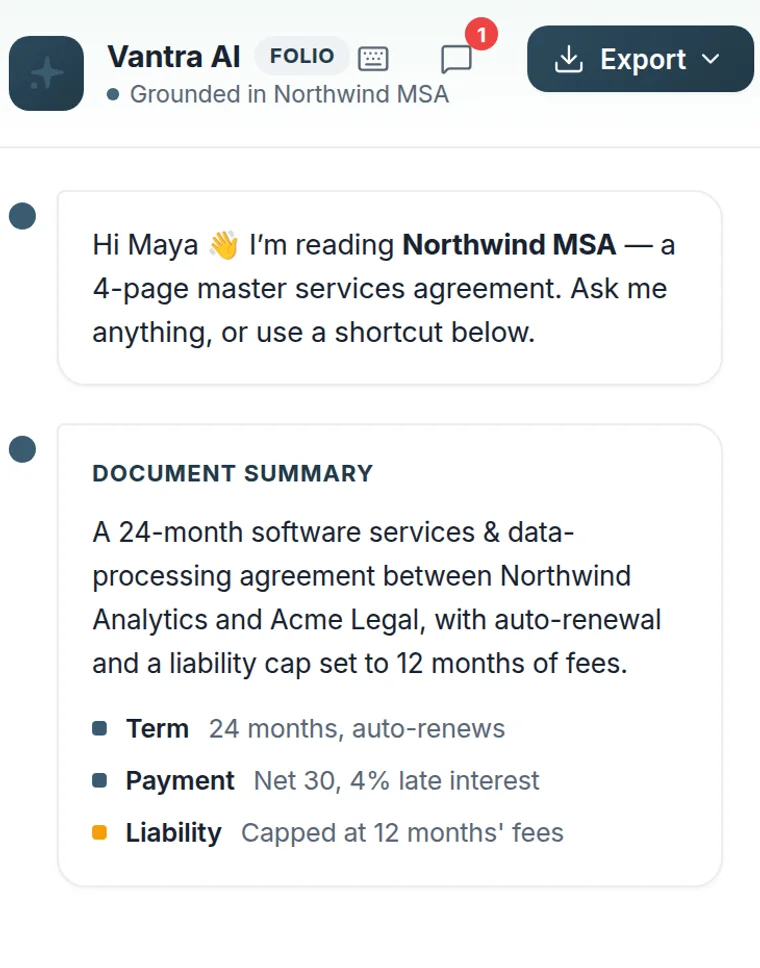
The Vantra AI panel grounded in an open agreement, showing a document summary with term, payment, and liability.

An assistant that actually reads the document

Vantra AI is grounded in the document you have open — instant summaries, key terms, comparisons, and drafting help, right where you're working.

Learn more about Vantra AI
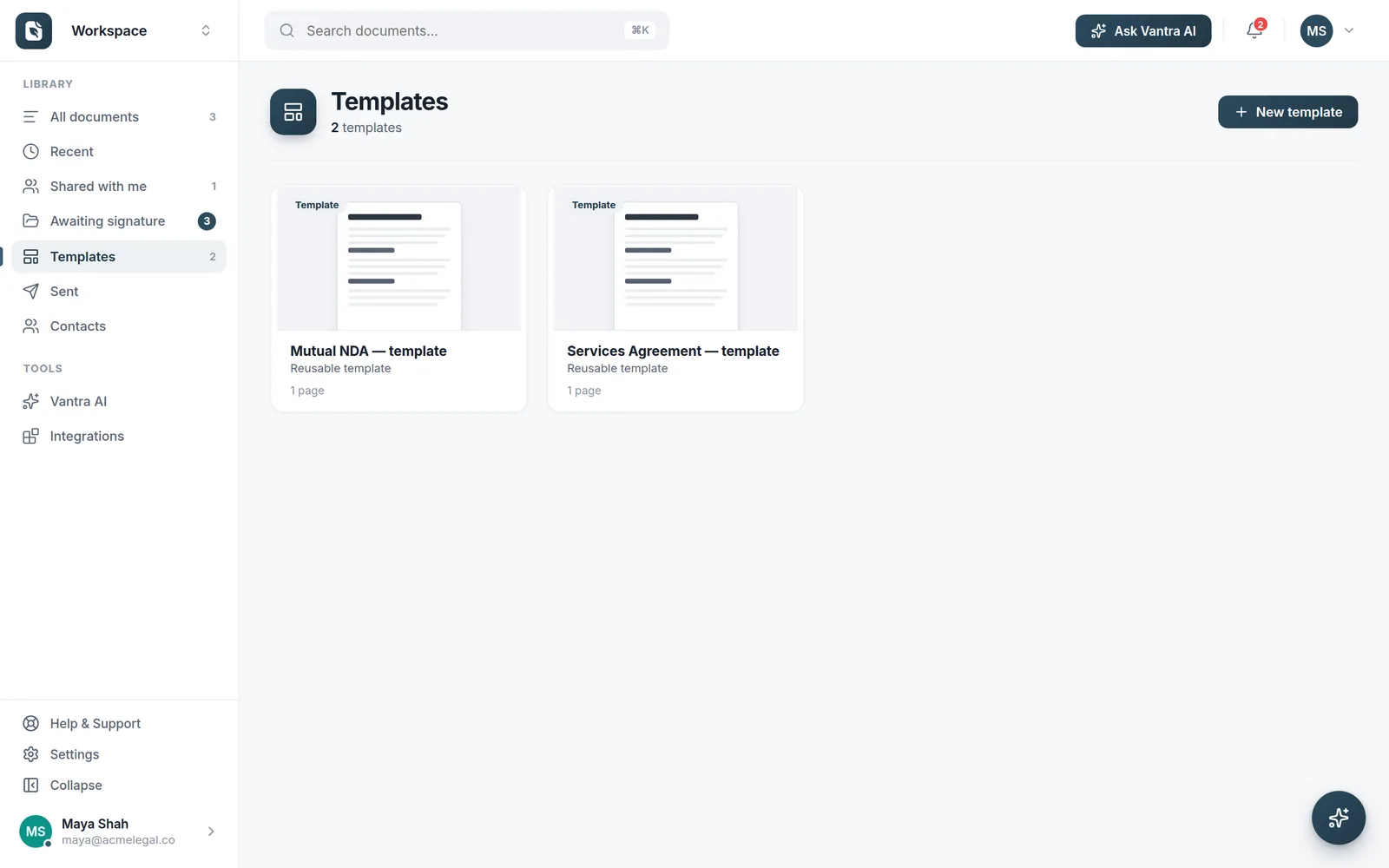
The Templates library with reusable NDA and services agreement templates.

Set it up once, reuse it forever

Save any document as a template, and smart fields anchor to your content — so next month's version lands with every field in the right place.

Learn more about smart fields
Why Folio

Retire the print-sign-scan routine

Getting a document signed shouldn't need three tools and a week of chasing.

The old way

  • Email attachments bouncing back and forth
  • Print, sign, scan — or paste a picture of a signature
  • Re-placing every field when the document changes
  • Chasing signers by hand, status buried in your inbox
  • An editor, an e-sign tool, and a tracker — three logins

With Folio

  • One secure link per signer — sign on any device
  • Real electronic signatures, done in the browser
  • Smart fields re-place themselves on every new version
  • Live tracking with one-click reminders
  • Edit, sign, and track in a single workspace
How it works

Three steps from document to signature

1

Create or upload

Start from a blank page in the block editor, pick a template, or upload the PDF you need signed.

2

Add fields & recipients

Drag signature and form fields into place, assign each one, and set the signing order.

3

Send & track

Recipients get a secure link and sign online. You watch progress live and get the completed document.

Who it's for

Built for the way you work

Legal & compliance

NDAs, engagement letters, and agreements — reviewed, signed, and versioned in one place.

HR & operations

Offer letters and onboarding packs from templates — new starters sign before day one.

Sales & agencies

Proposals and statements of work out the door faster — track exactly who's signed.

Freelancers

Contracts and briefs signed without the back-and-forth — free to start, no card needed.

New

Folio, now on your desktop

The same workspace as a native app for Windows and macOS — double-click any PDF to open it in Folio, and updates install themselves.

FAQ

Common questions

Is Vantra Folio free to use?

Yes — individuals can use Folio free. Paid plans add unlimited documents, templates, smart fields, and team workspaces. See pricing.

Do the people signing my documents need an account?

No. Recipients get a secure link and complete everything in the browser — no account, no downloads, on any device.

Are electronic signatures legally binding?

Electronic signatures are widely recognised, but validity depends on the document type and your jurisdiction — it's your responsibility to confirm they're appropriate for your use. See our Terms of Service.

What happens when my document changes each month?

Smart fields anchor to the words in your document rather than fixed positions, so when you upload a new version the fields land in the right place automatically.

Where is my data stored?

Folio is hosted on Microsoft Azure, with connections encrypted in transit and data encrypted at rest. Read more on our Security page.

More questions? Talk to us →

One workspace instead of three tools.

Draft, prepare, sign, and track — a contract goes from first edit to fully signed without ever leaving the page.

The Folio editor with an agreement open, highlights, and the Vantra AI panel.